Details
A simple pathtracer program, capable of producing renderings of simple bodies. The program computes global illumination, by intersecting scene objects, such as luminaries and solid bodies, with idealised surface properies.
- last updated: August, 2018


Screenshots
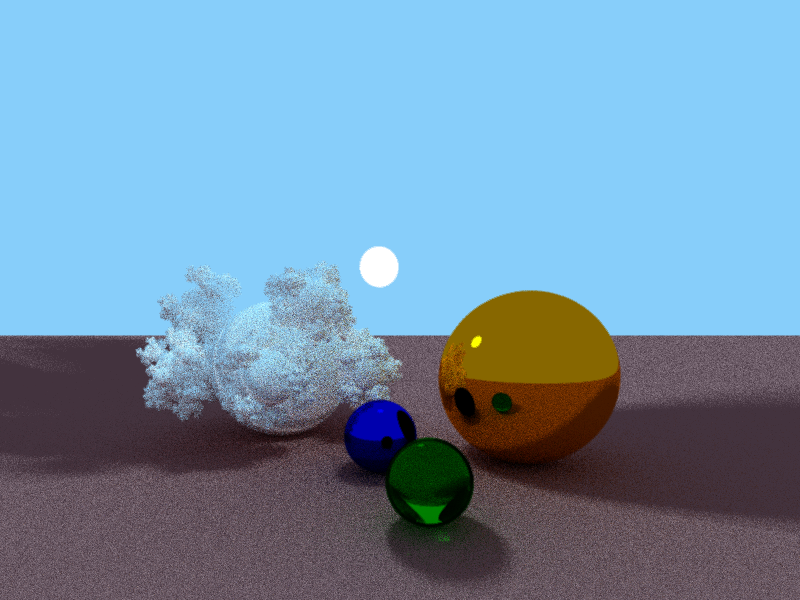
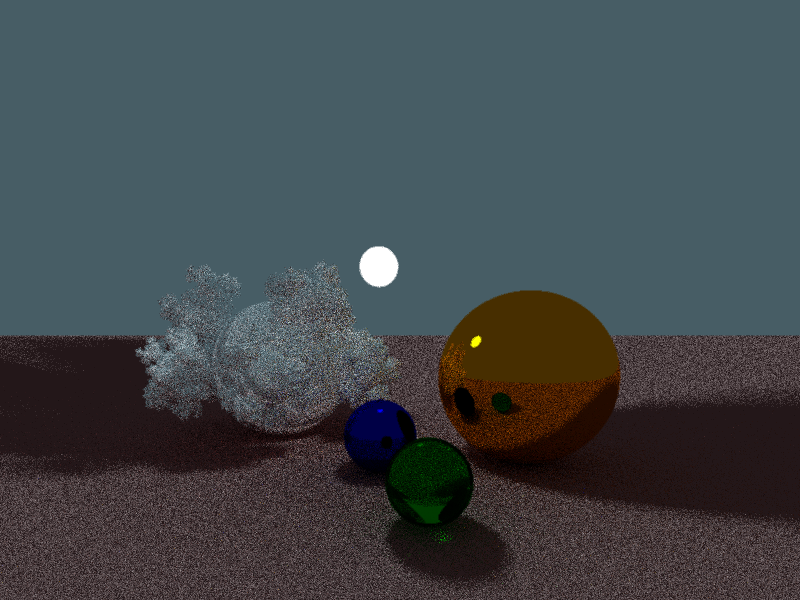
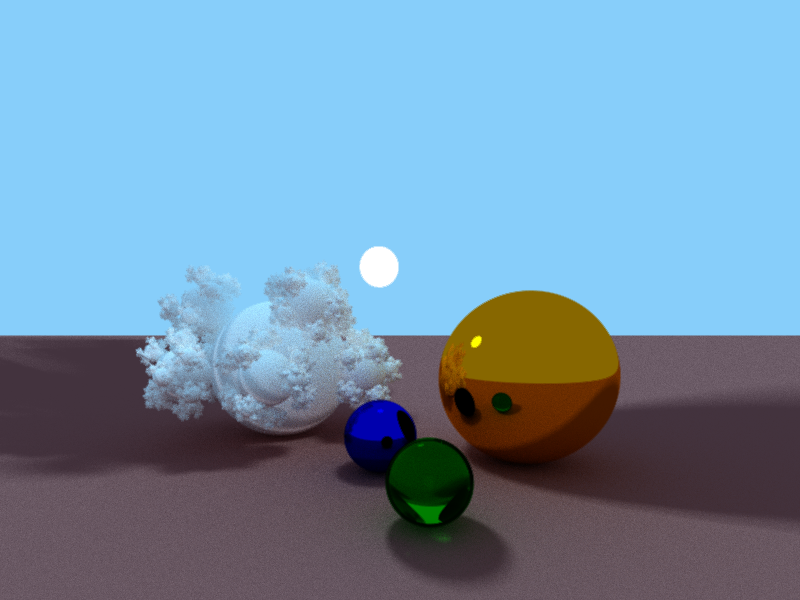
README.md
# Global illumination pathtracer
## Introduction
This project is based on the [smallpt](http://www.kevinbeason.com/smallpt/) project by Kevin Beason. It developed out of my curiosity for physically based rendering.
You can look on this document as notes on the project. The theoretical part in the "Basic radiometry" section is largely borrowed from the "Realistic Ray Tracing" book (Second Edition), by Peter Shirley.
For any future development, I will consider adding triangle and mesh intersection, scene management and improved materials. I was also thinking about doing a realtime GPU pathtracer as a GLSL fragment shader.
## Basic radiometry
To aid intuition, we will describe radiometry in terms of collections of large numbers of photons. A photon is a quantum of light that has a position, direction of propagation, and a wavelength `$\lambda$`. A photon also has a speed `$c$` that depends only on the refractive index `$n$` of the medium through which it
propagates. Sometimes the frequency `$f = c/\lambda$` is also used for light. This is convenient because unlike `$\lambda$` and `$c$`, `$f$` does not change when the photon refracts into a medium with a new refractive index. Another invariant is the amount of
energy `$q$` carried by a photon:
```$$ q=hf=\frac{hc}{\lambda}, $$```
where `$h = 6.6*10^{-34} \text{J.s}$` is Planck's constant.
An important quantity, we can define is the *spectral energy* `$Q_{\lambda}$`, defined as the energy for a wavelength interval, so for example:
```$$ Q_{\lambda}[500,600]= \frac{10.2}{100}=0.12\ \text{J.(nm)}^{-1}. $$```
The quantity `$Q$` is an intensive quantity. is opposed to an extensive quantity such as energy, length, or mass. Intensive quantities can be thought of as density functions that tell you the density of an extensive quantity at an infinitesimal point. For example, the energy `$Q$` at a specific wavelength is probably zero, but the spectral energy (energy density) `$Q_{\lambda}$` is a meaningful quantity.
It is also useful to estimate a rate of energy production for light sources. This quantity – *spectral power* `$\Phi$` can be defined as:
```$$ \Phi= \frac{\Delta Q}{\Delta t \Delta \lambda}. $$```
For example, if a light emits a power of `$100 \text{W}$` evenly distributed over wavelengths `$400 \text{nm}$` to `$800 \text{nm}$`, then the spectral power will be `$100\text{W}/400\text{nm} = 0.25\ \text{W.(nm)}^{-1}$`.
### Irradiance
The quantity *irradiance* measures the spectral power, incident on a surface. The spectral irradiance `$H$` would just be the power per unit area `$\Delta \Phi/\Delta A$`, or:
```$$ H= \frac{\Delta Q}{\Delta A \Delta t \Delta \lambda} \text{J.(m)}^{-2}\text{.(nm)}^{-1}\text{s}^{-1}. $$```
When the light is leaving a surface, e.g., when it is reflected, the same quantity as irradiance is called radiant exitance `$E$`.
### Radiance
The *radiance* in essence quantifies the spectral power per area `$\sigma$` of the unit sphere, centered at a detector/observer. The area `$\sigma$` is infact the projection of another area `$S$` upon the unit sphere, and is in fact how the area `$S$` is observed from the observers position. The area `$\sigma$` can also be called a solid angle. The solid angle is similar in spirit to an angle, but rather than the length of an arc on the unit circle it is the area of a region on the unit sphere, as mentioned already. This measure is in steradians.

Let's imagine a small irradiance meter at the observer's position and add on conical "baffler" which limits light hitting the meter to a range of angles with solid angle `$\Delta \sigma$`. The response of the detector, i.e. the radiance is:
```$$ \frac{\Delta H}{\Delta \sigma}= \frac{\Delta Q}{\Delta \sigma \Delta A \Delta t \Delta \lambda} $$```
This is the spectral radiance of light traveling in space. From now, we will drop the "spectral" in our discussion and assume that it is implicit.
Radiance is what we are usually computing in graphics programs. A wonderful property of radiance is that it does not vary along a line in space. This can be seen from the next figure. Let's assume the same kind of irradiance detectors, with the baffler, from above. Because the area of the surface being sampled is proportional to squared distance, and because the light reaching the detector is inversely proportional to squared distance, the two detectors should have the same reading.

We can define two radiance quantities. Surface radiance `$L_s$` for the radiance of (leaving) a surface, and field radiance `$L_f$` for the radiance incident at a surface. We can think of placing two detectors, with cone bafflers, measuring the irradiance `$H$` at the surface, and the exitance `$E$` from the surface. Note that the surface is not necessarily aligned with the cones. For this reason, we need to add a cosine term.

An thus, the radiance values `$L_s$` and `$L_f$` are:
```$$ L_f= \frac{\Delta H}{\Delta \sigma \cos \theta},$$```
```$$ L_s= \frac{\Delta E}{\Delta \sigma \cos \theta^{\prime}}.$$```
For a surface with field radiance `$L_f$`, we can write the irradiance as:
```$$ H= \int_{all\ \vec{k}} {L_f(\vec k) \cos \theta d \sigma }. $$```
The vector `$\vec k$` is an incident direction unit vector. The field radiance is potentially different for every direction, so we write it as a function `$L(\vec k)$`. For a hemisphere distribution for the incident direction `$\vec k = (\theta, \phi)$`:
```$$ d \sigma \equiv \sin \theta d \theta d \phi, $$```
```$$ H= \int_{\phi= 0}^{2 \pi} \int_{\theta= 0}^{\pi/2} {L_f(\theta, \phi) \cos \theta \sin \theta d \theta d \phi}. $$```
If the field radiance function is equal to a constant `$L_f= \text{L}$`, i.e. equal field radiance for all directions, the above integral evaluates to `$\pi \text{L}$`.
### BRDF
To fully describe the surface reflectance, we define the function `$\rho(\vec k_i, \vec k_o)$`, for all pairs of direction `$\vec k_i$` and `$\vec k_o$`:
```$$ \rho(\vec k_i, \vec k_o)= \frac{L_s(\vec k_o)}{L_f(\vec k_i) \cos \theta_i}. $$```
For any incident light coming from direction `$\vec k_i$`, there is some fraction scattered in a small solid angle near outgoing direction `$\vec k_o$`. The `$\rho(\vec k_i, \vec k_o)$` function is called the *bidirectional reflectance distribution function* (BRDF). The BRDF is all we need to know to characterize the directional properties of how a surface reflects light.
Using the definition for BRDF, we can formulate other usefull quantities. One such quantity is the *directional spherical reflectance* `$R(k_i)$`:
```$$ R(\vec k_i)= \frac{\text{power in all outgoing directions } \vec k_o}{\text{power in a beam from direction } \vec k_i}= \int_{\text{all } \vec k_o} {\rho(\vec k_i, \vec k_o) \cos \theta_o d \sigma_o}. $$```
This quantity has values between zero and one, for reasons of energy conservation. For any surface with `$\rho = C$` (Lambertian surface), the above integral evaluates to `$\pi C$`. For a perfectly reflective surface (`$R=1$`), we have `$\rho= 1/ \pi$`.
Another equation we can write using the BRDF, is the so-called *rendering equation*, in computer graphics:
```$$ L_s(\vec k_o)= \int_{\text{all } \vec k_i} {\rho(\vec k_i, \vec k_o) L_f(\vec k_i) \cos \theta_i d \sigma_i}. $$```
The above integrals give a usefull connection between incoming and outgoing energy fluxes on a surface. In essence the path tracer solves for the radiance using some computational integration method, often [*Monte Carlo integration*](https://en.wikipedia.org/wiki/Monte_Carlo_integration). The Monte Carlo formula for one sample is:
```$$ \int_{x \in S} {g(x) d \mu} \approx \frac{g(x_0)}{p(x_0)}, $$```
where `$x_0$` is a random variable with probability of occuring `$p(x_0)$`. So, for the radiance `$ L_s $`, we have:
```$$ L_s(\vec k_o) \approx \frac{\rho(\vec k_i, \vec k_o) L_f(\vec k_i) \cos \theta_i}{p(\vec k_i)}, $$```
where `$\vec k_i$` is choisen randomly with density `$p$`. Let's set `$p$` to:
```$$ p(\vec k_i)= \frac{\rho(\vec k_i, \vec k_o) \cos \theta_i}{R(\vec k_o)}, $$```
where `$R(\vec k_o)$` is the directional hemispherical reflectance. This choice for `$p$` yields:
```$$ L_s(\vec k_o) \approx R(\vec k_o)L_f(\vec k_i), $$```
which means that the radiance of a surface is just the fraction of energy reflected, multiplied by the color seen in the direction in which the viewing ray would scatter. This is the basis for how the pixel colors are computed in our program, as seen further down.
## Calculating intersections
Next, we will cover the basics of finding ray-object interections, using the parametric equation of a ray:
```$$ \vec p= \vec l_0 + t\vec l .$$```
The problem is to find a point of intersection `$\vec p$`, from the ray's origin `$\vec l_0$` along the ray's direction `$\vec l$` ( `$|\ \vec l\ |=1$`), by solving for `$t$`.
### Plane
An infinite plane can be defined as a point `$\vec p_0$` representing how far the plane is from the world origin and a normal `$\vec n$` (defining the orientation of the plane). For every other point `$\vec p$` on the plane, it is true that:
```$$ (\vec p - \vec p_0).\vec n= 0 .$$```
The vector `$(\vec p - \vec p_0)$` lies in the plane, and is therefore perpendicular to the normal vector `$ \vec n $`. A dot product between the two, should equal zero. By introducing the parametric equation for a ray, we get:
```$$ (\vec l_0 + t\vec l - \vec p_0).\vec n= 0 . $$```
Using this equation, `$t$` equals:
```$$ t= - \frac{(\vec l_0 - \vec p_0).\vec n}{\vec l.\vec n}= \frac{(\vec p_0 - \vec l_0).\vec n}{\vec l.\vec n}. $$```
Notice the denominator `$ \vec l.\vec n $`. If the dot product equals zero, then the ray direction `$\vec l$` is parallel to the plane, and there will be no intersection. In all other cases `$t$` must be computed.
### Sphere
A ray can intersect a sphere at two points – like points `$\vec t_0$` and `$\vec t_1$` on the next figure. If the ray is tangent to the sphere, then we have `$\vec t_0= \vec t_1$`.

Again, looking at the picture, we have:
```$$ \vec t_{0,1}= \vec d (t_m \pm \Delta t) $$```
So, to find points `$\vec t_0$` and `$\vec t_1$`, we first need to find `$t_m$` and `$\Delta t$`. Let's choose a coordinate system, with origin – the center of the sphere. Then the length `$t_m$` will simply be the projection of `$(-\vec p)$` upon the ray direction vector `$\vec d$`:
```$$ t_m= - \vec p.\vec d. $$```
If `$t_m$` is smaller than `$0$`, there is no intersection. Next, we need to notice two right triangles: `$(\vec 0, \vec p, \vec p + \vec d(t_m))$` and `$(\vec 0, \vec p + \vec d(t_0), \vec p + \vec d(t_m))$`. We can apply the Pythagorean theorem for both triangles, to find `$\Delta t$`. First, using the first triangle, we compute the squared length `$l^2_m$`:
```$$ l^2_m= \vec p.\vec p - (\vec p. \vec d)^2.$$```
Note, that if `$l^2_m$` is bigger than the sphere radius `$r$`, then we have no intersection. Finally, we find `$\Delta t$`, using the second triangle:
```$$ \Delta t= \sqrt{r^2- l^2_m}, $$```
where as mentioned before `$r$` is the sphere radius.
## Program source
In this section, we cover some of the project's source code.
### Data structures
#### The `vec3` class
```cpp
class vec3 {
public:
vec3();
vec3(const double x, const double y, const double z);
...
inline double length() const { ... }
inline vec3 negative() const { ... }
inline vec3 normalize() const { ... }
inline double dot(const vec3& v) const { ... }
inline vec3 cross(const vec3& v) const { ... }
inline vec3 add(const vec3& v) const { ... }
inline vec3 scale(const double scalar) const { ... }
inline vec3 reflect(const vec3& n) const { ... }
double x, y, z;
};
```
#### The `ray` class
```cpp
class ray
{
public:
ray(); { direction.x= 1; }
ray(const vec3& origin, const vec3& dir);
vec3 origin, direction;
};
```
#### The `color` class
```cpp
class color
{
public:
color(const double red= 0.0f, const double green= 0.0f, const double blue= 0.0f);
inline double brightness() const { ... }
inline color add(const color& c) const { ... }
inline color mult(const color& c) const { ... }
inline color scale(const double s) const { ... }
inline color average(const color& c) const { ... }
inline color clamp() { ... }
double red, green, blue;
};
```
#### The `material` class
```cpp
class material
{
public:
enum type {diffuse, specular, refractive};
material(){}
material(const double emission, const color& c): mult_emission(emission), material_color(c) {}
material(const color& c, material::type matType, double refractI= 3.0, const double emission= 0.0f): material_color(c), refract_index(refractI), mult_emission(emission), material_type(matType) {}
color material_color;
type material_type;
double refract_index;
double mult_emission;
};
```
#### The `camera` class
```cpp
class camera
{
public:
camera(const vec3& pos, const vec3& upVect, const vec3& lookAt);
inline vec3 const & pos() { ... }
inline vec3 const & dir() { ... }
inline vec3 const & right() { ... }
inline vec3 const & down() { ... }
inline vec3 const & up_vect() { ... }
inline void look_at(const vec3& lookat) { ... }
inline void pos(const vec3& pos) { ... }
inline void up_vect(const vec3& upVect) { ... }
private:
void recalc(const vec3* pos, const vec3* lookAt);
vec3 right_, down_, pos_, dir_, up_vect_;
};
```
#### The `object` class
The abstract `object` class is the interface for all scene objects. Every type of object must provide a `intersects` function definition, which is used to determine if a given ray intersects an object at some position `pos()`, of that type. All objects must also have an associated `material` (`object_material()`).
```cpp
class object
{
public:
virtual bool intersects(const ray& ray, double& length, vec3& normal, material& material) const =0;
const material* object_material();
const vec3& pos();
protected:
object();
object(const material& material);
const material* material_;
vec3 pos_;
};
```
In the current implementation, there are several types of objects, namely: `plane`, `sphere`, `box` (axis aligned box) and `sphereflake`.
### The `main` method
The main method is pretty straightforward. First, the scene objects and the output pixel colors array are initialized, then we compute the color for each pixel, and finally the colors array is exported to a bitmap.
```cpp
int main(){
//INIT SCENE AND PIXEL COLORS ARRAY
...
//SAMPLE PIXEL COLORS
...
//OUTPUT PIXELS COLOR ARRAY TO BITMAP
...
```
#### Pixel color sampling
Each pixel color is computed, by randomly sampling the field radiance several times (`numOfSamples`), at the four corners to the pixel position in image space `(i/bigDim, (imHeight-j)/bigDim)` (`bigDim= (imWidth> imHeight)? imWidth: imHeight`).
```cpp
int main(){
...
//SAMPLE PIXEL COLORS
float jitter[4 * 2] = {
-1.0/4.0, -1.0/4.0,
3.0/4.0, -1.0/4.0,
-1.0/4.0, 3.0/4.0,
3.0/4.0, 3.0/4.0,
};
vec3 camRayOrigin= sceneCamera->pos();
vec3 camDir= sceneCamera->dir();
vec3 camRight= sceneCamera->right();
vec3 camDown= sceneCamera->down();
int numOfSamples= 3;
double bigDim= (imWidth> imHeight)? imWidth: imHeight;
for (int j= 0; j < imHeight; j++) {
for (int i= 0; i < imWidth; i++) {
for (int k = 0; k < 4; k++) {
color sampledCol;
for (int s= 0; s < numOfSamples; s++) {
double l1= rand_01()*0.5;
double l2= rand_01()*0.5;
vec3 offsetVec= vec3(
2.0 * (i + jitter[2*k]+l1)/bigDim - 1.0,
2.0 * (imHeight-j + jitter[2*k+1]+l2)/bigDim - 1.0,
0);
//construct camera ray
vec3 camRayDirection= camDir.add(camRight.scale(offsetVec.x).add(camDown.scale(offsetVec.y)));
ray camRay= ray(camRayOrigin, camRayDirection.normalize());
sampledCol= sampledCol.add(radiance(camRay, 0).scale(1/(double)numOfSamples));
}
pixelColors[imWidth*j+i]= pixelColors[imWidth*j+i].add(sampledCol.clamp().scale(1/(4.0f)));
}
}
}
//OUTPUT PIXELS COLOR ARRAY TO BITMAP
outputbmp("./test.bmp", imWidth, imHeight, 72, pixelColors);
...
}
```
### The `radiance` function
The `radiance` function computes a color value, based on a input ray `r`, using all available scene information. The first part of the procedure involves checking for an ray-object intersection with all scene objects. The `object` interface ensures that every scene entity will provide a normal vector `n` and material information `material` at the intersection point, if an intersection occurs. If there is no intersection, the function returns the global `background` color.
```cpp
color radiance(const ray &r, int depth)
{
double t;
vec3 n, x, nl;
material mat;
//intersects a scene object?
object* winObject= intersect(r, &t, &n, &mat);
if (winObject== NULL) return background;
//calc intersect world coord
x= r.origin.add(r.direction.scale(t));
//normal vector on the side on the ray
nl= (n.dot(r.direction)< 0)? n: n.scale(-1);
color& col= mat.material_color;
color emmitIntensity= col.scale(mat.mult_emission);
...
//DO A RECURSION CHECK
...
//CALC OUTPUT COLOR, BASED ON THE MATERIAL TYPE
if(mat.material_type == material::diffuse){
...
}
else if(mat.material_type == material::specular){
...
}
...
}
```
After the intersection check, a recursion check is performed. If the function is allowed to continue, we compute the radiance, at the point of ray intersection, according to the material properties of the surface.
#### Recursion
The program is called a *pathtracer*, because the `radiance` function can potentially be called recursively, to compute a ray's "path" as shown on the following figure.

If we take the picture for example, the radiance at the point of interest `$x_0$` is estimated as:
```$$ L= L_{e1} + R_1(L_{2e}+ R_2(L_{3e}+R_3(L_b))), $$```
where `$R_i$` is the reflectance at `$x_i$`; `$L_{ei}$` is the emmited radiance at `$x_i$`; and `$L_b$` is the radiance of the background.
The pathtracing recursion is ended, by random chance, when a max allowed depth is exceeded. The probability of ending the recursion is `1-maxIntensity`, where `maxIntensity` is the biggest material color component at the point of intersection. If the intensity at that point is small, then the probability of ending the recursion is large, but there is a large intensity the recursion is more likely to continue. All color components ofcourse have values from zero to one.
```cpp
color radiance(const ray &r, int depth)
{
//DO A RECURSION CHECK
double maxIntensity = (col.red> col.green && col.red> col.blue)? col.red : (col.green> col.blue)? col.green : col.blue; // max refl
...
if(++depth> maxIntensity)
{
if(rand_01()< maxIntensity){col= col.scale(1.0f/maxIntensity);}
else return emmitIntensity;
}
...
}
```
#### Diffuse reflection
The idea here, is that diffusive surfaces reflect light in a multitude of directions, because of some fine surface features. The directions of the reflected rays can be computed by generating random points on a unit hemisphere. These random points will have the so-called phong density:
```$$ p(\theta, \phi)= \frac{1}{\pi} \cos \theta. $$```
We can generate two random points `$\xi_1$` and `$\xi_2$` with uniform density and then transform them to `$(\theta, \phi)$` coordinates by:
```$$ \cos \theta= \sqrt{ 1- \xi1}, $$```
```$$ \phi= 2 \pi \xi_2 . $$```
Given an orthonormal basis `$\text{uvw}$`, where `$\hat w$` is the normal vector `$\vec n$` at the point on the surface, the outgoing reflected ray direction `$b$` is:
```$$ \vec b= \hat u \cos \phi \sin \theta + \hat v \sin \phi \sin \theta + \hat w \cos \theta. $$```
The `$sin \theta$` can be computed using the relation `$\sin \theta = \sqrt{1- cos^2 \theta}$`.
It must be mentioned that, the next code snippet contains an additional explicit luminaries sampling, which is used to trace the hard shadows on the final image.
```cpp
color radiance(const ray &r, int depth)
{
...
//CALC OUTPUT COLOR, BASED ON THE MATERIAL TYPE
if(mat.material_type == material::diffuse){
//printf("here;\n");
//gen uvw basis, w = nl
vec3 w= nl;
vec3 u= ((fabs(w.x)>0.1f? vec3(0.0f, 1.0f, 0.0f): vec3(1.0f, 0.0f, 0.0f)).cross(w)).normalize();
vec3 v= w.cross(u);
color diffcol;
//generate new random direction vec3, based on a hemisphere distribution
double r1= 2*pi*rand_01();
double r2= rand_01();
double r2s= sqrt(r2);
vec3 d = (u.scale(cos(r1)*r2s)//u
.add(v.scale(sin(r1)*r2s))//v
.add(w.scale(sqrt(1-r2))))//w
.normalize();
color e;
//for (int i=0; i<numSpheres; i++){
int h= 0;
object* s= NULL;
//explicit luminaries sampling
while((s = sceneObjects[h])!= NULL){
if(s->object_material()->mult_emission<= ACCURACY){h++; continue;}
const material* sMat= s->object_material();
vec3 sw= s->pos().add(x.negative());
vec3 su= ((fabs(sw.x)>.1?vec3(0.0f, 1.0f, 0.0f): vec3(1.0f, 0.0f, 0.0f)).cross(sw)).normalize();
vec3 sv= sw.cross(su);
double cos_a_max = sqrt(1-0.25/(sw.negative().dot(sw.negative())));
double eps1= rand_01(), eps2 = rand_01();
double cos_a = 1-eps1+eps1*cos_a_max;
double sin_a= sqrt(1-cos_a*cos_a);
double phi= 2*pi*eps2;
vec3 l= su.scale(cos(phi)*sin_a).add( sv.scale(sin(phi)*sin_a)).add(sw.scale(cos_a)).normalize();
if(intersect(ray(x, l)) == s)
{
double omega = 2*pi*(1-cos_a_max);
e= sMat->material_color.add(col.mult(e.scale(l.dot(nl)*omega))).scale(1.0f/pi);
}
h++;
}
return emmitIntensity.add(e).add(col.mult(radiance(ray(x, d), depth)).clamp());
}
...
}
```
#### Specular reflection
Ideal specular reflection occurs on ideal mirror surfaces. Computing the specular reflection involves following the law of reflection, which states that the angle of incident light relative to the surface normal is the same as the angle of reflected light, and that the incident direction, surface normal, and reflected direction are coplanar. For an incident vector `$\vec d$`, and normal vector `$\vec n$`, the reflected vector `$\vec r$` can be easily computed as:
```$$ \vec r= \vec d + 2 \vec a= \vec d - 2(\vec d. \vec n)\vec n. $$```
This can be seen on the following figure.

```cpp
color radiance(const ray &r, int depth)
{
//CALC OUTPUT COLOR, BASED ON THE MATERIAL TYPE
if(mat.material_type == material::diffuse){
...
}
else if(mat.material_type == material::specular){
vec3 reflDir= r.direction.reflect(n);
return emmitIntensity.add(col.mult(radiance(ray(x, reflDir),depth)));
}
...
}
```
#### Refraction from smooth dielectrics
A *dielectric* is a transparent material that refracts light. Diamonds, glass, water, and air are dielectrics. Dielectrics also filter light; some glass filters out more red and blue than green light, so the glass takes on a green tint. When a ray travels from a medium with refractive index `$n$` into one with a refractive index `$n_t$` some of the light is transmitted, and it bends. This effect, shown for `$ n_t \gt n$` on the next figure, is governed by Snell's law:
```$$ n \sin \theta = n_t \sin \theta^{\prime}. $$```

From the figure, we can see that `$\vec n$` and `$\vec b$` form a basic for the plane of refraction. We can describe the direction of the refracted ray `$\vec t$` in this basis as:
```$$ \vec t= \vec b \sin \theta^{\prime} - \vec n \cos \theta^{\prime}. $$```
Using `$\vec d$` for that basis, wecan solve for `$\vec b$`:
```$$ \vec d= \vec b \sin \theta - \vec n \cos \theta, $$```
```$$ \vec b= \frac{\vec d + \vec n \cos \theta}{\sin \theta}. $$```
Using the unit circle equation `$\sin^2 \theta + \cos^2 \theta = 1$`, we can derive the following relation:
```$$ \cos^2 \theta^{\prime}= 1 - \frac{n^2}{ n^2_t}(1 - \cos^2 \theta ) $$```
Now putting all known variables and relations, we can solve for `$\vec t$`:
```$$ \vec t= \frac{n}{n_t}(\vec d + n \cos \theta) - \vec n \cos \theta^{\prime}= \frac{n}{n_t}(\vec d + n \cos \theta) - \vec n \sqrt{1- \frac{n^2}{n^2_t}(1-(\vec d . \vec n)^2)}. $$```
The case, when the term under the square root is negativem, is when we have *total internal reflection*. This occurs, when `$\cos^2 \theta = (\vec d . \vec n)^2$` is:
```$$ \cos^2 \theta \lt 1 - \frac{n^2}{n^2_t}. $$```
When computing refraction, there is an important choice, whether to send two rays – one reflected and one transmitted, or to send one of the two, determined by chance. In this program, we choose to send one ray, only when the depth goes beyond a certain value. In that case, if the probability of sending a reflected ray is `$P$`, then a transmitted ray will be send with probability `$1-P$`. More importantly, we need to weight the resulting radiance values by their probability of occuring. If we choose a reflected ray, then we have:
```$$ L= L_e + R(\theta)\frac{\text{radiance(ray(}\vec x_{inters.},\vec d - 2(\vec d. \vec n)\vec n \text{))}}{P}. $$```
Otherwise, for a transmitted ray, we have:
```$$ L= L_e + (1-R(\theta))\frac{\text{radiance(ray(}\vec x_{inters.},\vec t \text{))}}{(1-P)}. $$```
Here, we can simulate the surface behaviour of real metals, where the reflectance increases with `$\theta$`. This can be done using the Schlick's approximation:
```$$ R(\theta) \approx R_0 + (1- R_0)(1- \cos \theta)^5, $$```
where `$R_0$` is the reflectance when `$\vec d$` is parallel to `$\vec n$`.
```cpp
color radiance(const ray &r, int depth)
{
...
//CALC OUTPUT COLOR, BASED ON THE MATERIAL TYPE
...
vec3 reflDir= r.direction.reflect(n);
ray reflRay(x, reflDir);
bool into = n.dot(nl)>0;
double nc= 1;
double nt= mat.refract_index;
double nnt= into? nc/nt: nt/nc;
double ddn= r.direction.dot(nl);
double cos2t= 1-nnt*nnt*(1-ddn*ddn);
if (cos2t<0)//total internal reflection
return emmitIntensity.add(col.mult(radiance(reflRay, depth)));
vec3 tDir = (r.direction.scale(nnt).add(n.scale(((into?1:-1)*(ddn*nnt+sqrt(cos2t)))).scale(-1.0f))).normalize();
double a= nt-nc;
double b= nt+nc;
double R0=a*a/(b*b);
double c = 1-(into? -ddn: tDir.dot(n));
double Re= R0+(1-R0)*c*c*c*c*c; //Schlick's approximation
double Tr= 1-Re;
double P= 0.25+ 0.5*Re;
double RP= Re/P;
double TP= Tr/(1-P);
if(depth> 2)
return emmitIntensity.add(col.mult(
rand_01()< P? radiance(reflRay, depth).scale(RP)
: radiance(ray(x, tDir), depth).scale(TP)));
else
return emmitIntensity.add(col.mult(radiance(reflRay, depth).scale(Re).add(radiance(ray(x, tDir), depth).scale(Tr))));
}
```
## Sources
* Peter Shirley, Realistic Ray Tracing (A. K. Peters, 2003)
* http://www.kevinbeason.com/smallpt/
* http://www.scratchapixel.com/lessons/3d-basic-rendering/minimal-ray-tracer-rendering-simple-shapes/ray-plane-and-ray-disk-intersection